Every local agency owner knows the drill. You land a meeting with a promising client, stay up late building a deck, and hope the design looks as good as your pitch sounds.
Most of the time, it doesn’t.
An AI presentation generator for agencies changes that game completely. Instead of spending hours in slide software, you describe your idea and let AI structure, design, and format it for you.
The result is a professional presentation that looks like it took a design team days to build, but takes you minutes instead.

This matters most for small and local agencies. You’re competing against bigger shops with in-house designers and bigger budgets.
An AI presentation maker levels that field. You get presentation creation tools built for speed, without giving up polish or brand control.
Why Faster, Tailored Decks Matter for Local Agency Sales
Local clients judge you fast. A sloppy business presentation tells them you’ll be sloppy with their marketing budget too.
Speed and quality both matter, and they don’t have to trade off against each other anymore. Local decision-makers see a lot of sales presentations from agencies chasing their business.
The ones that win are tailored, specific, and easy to skim. That means less generic filler and more proof that you understand their business.

The Cost of Generic Proposals and Static PDFs
A static PDF feels dated the moment a client opens it. It can’t be updated on the fly, doesn’t invite questions, and often gets skimmed in under a minute.
Generic proposals cost you more than time. They signal low effort, and busy local business owners notice.
Common issues with old-school proposals:
- Reused templates that don’t mention the client’s actual business
- Text-heavy pages with no visual hierarchy
- No way to track if the client even opened the file
- Outdated case studies that don’t match the client’s industry
What Local Decision-Makers Need to See Before They Buy
Local business owners are not comparing you to Fortune 500 marketing departments. They’re comparing you to the last three agencies who pitched them.
They want to see:
- A clear plan tied to their specific goals
- Simple pricing without confusing jargon
- Case studies from businesses like theirs
- An executive summary they can scan in 30 seconds
Presentation quality signals competence. If your slides look rushed, clients assume your work will be too.
Build a 10-Minute Pitch Narrative Before Generating Slides
Great pitch decks don’t start with a slide deck tool. They start with a clear story.
Get the narrative right first, then let an AI presentation creator turn it into a polished slide deck in minutes.

Start With Discovery Notes, Goals, and Proof
Before you open any ai slideshow maker, gather three things: what the client told you in discovery, what they actually want to achieve, and proof you can deliver it.
This is the same prep work investors expect in an investor pitch deck. Skip it, and even the best AI presentations will feel hollow.
Quick checklist:
- Client’s stated pain point (in their own words)
- Their measurable goal, like leads or foot traffic
- One or two proof points: past results, testimonials, or case studies
Use a Simple Problem-to-Next-Step Story Arc
Slide decks that convert follow a simple arc: problem, solution, proof, next step. Don’t overthink slide copy at this stage.
A basic structure looks like this:
- The problem the client is facing right now
- Your specific solution to that problem
- Evidence it works, using data or a similar client
- A clear next step, like signing or scheduling a call
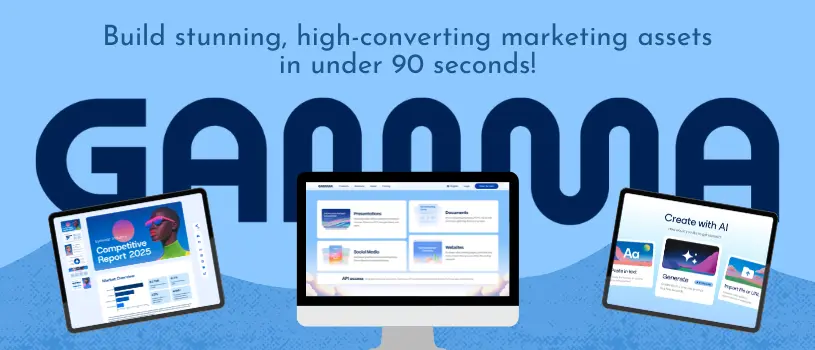
Once this outline exists, tools like Gamma can turn it into a full slide deck fast, since the thinking is already done. You just feed it your Litlink AI presentation generator prompt and structure, and the platform builds the rest.
Turn Client Inputs Into an Interactive Proposal
Once you have a narrative, the next step is turning raw client information into something the AI can actually use. This works best when you give the ai presentation tool clean, specific input instead of vague instructions.
Use Prompts and Source Files Without Losing Context
Most ai presentation tools accept more than typed prompts. You can often upload a Word doc, a txt file, or even an old ppt file from a previous client pitch.
Feeding in real source material helps the ai business presentation stay accurate. It reduces the chance the ai models will invent details or generic filler.
A few tips:
- Paste discovery call notes directly instead of summarizing them yourself
- Upload past proposals so the tool can match your usual structure
- Keep client-specific numbers and names in the prompt, not just general instructions
Most platforms use ai credits per generation, so it helps to write one solid, detailed prompt rather than several vague ones. A free ai presentation maker tier is often enough to test this workflow before committing to a paid plan.
Make Recommendations Feel Specific to the Client
Generic recommendations are the fastest way to lose a local pitch. After the first draft of presentation generation, go back through and swap generic phrases for client specifics.
Replace lines like “grow your online presence” with actual numbers, local competitor mentions, or the client’s own goals from your notes. This small step separates a forgettable deck from one that gets signed.
Design for Trust, Brand Consistency, and Clear Decisions
Design isn’t decoration. It’s how a client decides, often subconsciously, whether they trust your agency with their money.
Choose Layouts That Support the Message
Good presentation design gets out of the way of your message instead of competing with it. Presentation templates should match the type of content on each slide, not just look nice.
Some quick rules of thumb:
- Use data-heavy layouts only when you have real numbers to show
- Keep text slides short, ideally under 20 words per slide
- Reserve full-image slides for emotional moments, like a client success story
Premium templates from tools like Canva or a dedicated ai presentation generator can speed this up, but always check that the layout fits the message, not just the brand colors.
Review AI Drafts Before They Reach the Client
AI-generated drafts need a human check before they go out. Brand consistency slips happen when logos, fonts, or color codes don’t match your agency’s actual brand kit.
Before sending anything, check:
- Logo placement and sizing on every slide
- Consistent fonts and colors throughout
- No leftover placeholder text from the ai presentation maker
- Accurate client name and details on every mention
Share, Export, and Reuse the Winning Proposal Workflow
How you deliver a pitch matters almost as much as what’s in it. The right format can make follow-up easier and keep your agency looking current.
When to Send a Live Deck Instead of an Attachment
A live, shareable link often beats a pptx export or PDF attachment. Clients can view it on any device, and you can update it after the meeting without resending files.
Live decks work well for:
- First pitches where you want to track engagement
- Proposals with pricing that might change
- Clients who prefer viewing on mobile
Keep Editable Files Available for Client Requirements
Some local clients or their accountants still want a Microsoft PowerPoint or Google Slides file for their records. Keep pptx export and other formats ready to go.
Common client requests to prepare for:
| Client Need | Best Format to Provide |
|---|---|
| Internal team review | PowerPoint or Google Slides |
| Board or investor sharing | Apple Keynote or PDF |
| Quick mobile viewing | Live shareable link |
| Print records | PDF export |
Educators and consultants use this same flexible export approach for performance reporting and training materials, since different presentation tools serve different audiences. Keeping multiple export options ready saves you from awkward follow-up requests later.
Frequently Asked Questions
What is the best AI presentation generator for agencies?
The best choice depends on your agency’s size and needs, but tools that combine speed with strong design control tend to work best for local agencies. Look for one that lets you import client notes, keep your brand consistent, and export to common formats like PowerPoint.
Gamma is a popular option for agencies that want fast, polished results without a design team.
Can agencies create client-ready presentations with an AI PPT maker?
Yes, most modern AI PPT makers produce presentations that are ready to send after a quick review. They handle layout, formatting, and design automatically, so your team focuses on the message instead of manual slide building.
A short human review step still helps catch any brand or accuracy issues before sending.
Are there free AI presentation tools available for agency teams?
Many AI presentation generators offer a free ai presentation maker tier with limited credits or features. These are useful for testing a workflow before your agency commits to a paid plan.
Free tiers usually cap the number of presentations or exports per month.
How can AI generate branded presentations from a brief or outline?
You can paste a client brief, project outline, or discovery notes directly into the ai presentation tool as a prompt. The AI then structures that content into slides, matching your saved brand colors, fonts, and logo if the tool supports brand kits.
The more specific your input, the more accurate and useful the output will be.
Which AI presentation makers support collaboration and reusable templates?
Several ai presentation tools let teams save templates for reuse across client pitches, which speeds up future proposals significantly. Look for platforms that support real-time collaboration, so multiple team members can edit or comment on a deck at once.
This matters most for agencies handling several client pitches at the same time.
Can an AI presentation generator export slides to PowerPoint or Google Slides?
Most AI presentation generators let you export to pptx files. Many also allow direct export to Google Slides or Apple Keynote.
This flexibility is super handy when clients or teammates need an editable file instead of just a live link. Always check the export quality before using it for a big presentation, since some tools handle formatting better than others.