Local agencies live and die by turnaround time. A client calls at 4 PM asking for a revised pitch deck by tomorrow morning, and your team scrambles to build something that looks professional without pulling an all-nighter.
That pressure is exactly why so many small agencies are testing AI presentation tools like Gamma AI. The big question: can these tools handle real client work, not just internal brainstorms?

This guide looks at Gamma as an asset creation tool, especially for fast-paced local agencies. We’re talking about teams juggling multiple clients, tight deadlines, and small teams that can’t afford a dedicated designer for every project.
Gamma works well for agencies that need to turn client input into polished decks, proposals, or web pages quickly. But it does have some limits around brand governance and file handoff that you’ll want to test before betting the farm on it.
Let’s break down where Gamma shines, where it struggles, and how to give it a spin before committing your whole team.
Key Takeaways
- Fast-paced agencies need speed and consistent branding. AI tools can deliver both if you test them properly first.
- Gamma AI turns rough client notes and outlines into usable first drafts quickly, but human review is still crucial for accuracy and polish.
- Before standardizing on any tool, agencies should pilot it on real client work and check exports, brand controls, and collaboration features.
What Local Agencies Need From an Asset Creation Platform
Local agencies handle a mix of recurring deliverables for different clients, often on the same day. A platform needs to keep presentations, client proposals, and pitch decks consistent with each client’s branding while letting your team move fast enough to hit those same-week deadlines.
Recurring Deliverables Across Client Accounts
Most local agencies produce the same types of assets over and over: monthly marketing reports, pitch decks, social media proposals, and branded campaign content. The challenge isn’t creativity—it’s keeping up the quality while cranking out similar work all week long.
A content creation platform that lets you reuse structure while swapping in new client details can save hours every week.
Speed Without Sacrificing Brand Quality
Speed matters, but not if it means sending something sloppy to a client. You need tools that produce something presentable on the first try, not a rough draft that still needs hours of formatting.
Brand consistency across every deliverable—logos in the right spot, colors matching guidelines—builds trust with clients who expect a polished visual identity every time.
Approval, Handoff, and Sharing Requirements
Client work rarely ends with one draft. Agencies need a smooth way to share drafts for approval, collect feedback, and hand off final files in whatever format the client expects.
Some clients want a PowerPoint file they can edit themselves. Others are fine with a shareable link.
Knowing your handoff requirements before choosing a tool avoids awkward surprises later.
From Brief to First Draft With AI
Getting from a client brief to a usable first draft is where AI presentation tools really earn their keep. Gamma AI and similar tools use generative AI models (think GPT and Claude) to turn prompts, outlines, or existing content into a structured draft in minutes.
Starting With Prompts, Outlines, or Existing Content
You can start a Gamma project three ways. Type a simple prompt describing the client and goal, paste in an outline, or upload existing content like a PDF or old proposal.
Pasting in real client notes usually produces a more accurate first draft than a vague one-line prompt. Feeding the tool specifics—client name, target audience, key talking points—cuts down on rewrite time later.
Turning Source Material Into Multiple Client Assets
One cool thing: a single piece of source material, like a client’s intake questionnaire or campaign brief, can become several different assets. A brief might turn into a pitch deck, a one-page proposal, and a follow-up summary document, all pulling from the same core content.
This is a lifesaver for agencies managing several small deliverables per client instead of one big project.
Where Human Review Still Matters
AI-generated content still needs a human check before it goes anywhere near a client. Facts can get mixed up, tone might feel generic, and image choices sometimes miss the mark.
Budget time for a quick review pass, especially on client-facing numbers, testimonials, or claims. You’ll save AI credits by editing slides by hand instead of regenerating them over and over.
Design Control and Brand-Safe Output
Agencies can’t hand a client a deck that looks like it came from a generic template library. Gamma’s design controls—custom themes, brand kits, and font uploads—aim to close that gap, though the depth of control depends on your pricing tier.
Themes, Colors, Fonts, and Logos
Higher-tier Gamma plans allow custom fonts and more detailed brand customization. Setting brand colors and uploading a client’s logo once, then reusing that theme across every deck for that account, keeps output consistent.
AI image generation fills in visuals when a client doesn’t provide their own photography, though results can be hit-or-miss for niche local businesses.
Adapting Templates for Different Local Clients
Running several clients through one tool means juggling multiple visual identities at once. Save separate brand kits or themes per client so nobody accidentally sends a restaurant client a deck styled for a law firm.
This small habit prevents embarrassing mix-ups when your team is moving fast between accounts.
Visual QA Before Client Delivery
Before anything goes out, run a visual quality check. Verify the logo isn’t stretched, colors match the brand guide, and fonts render correctly across devices.
AI-generated layouts sometimes place text awkwardly over images or misjudge spacing on longer slides. A five-minute scroll-through catches most of these issues before a client ever sees them.
Collaboration, Publishing, and Client Engagement
Agency work is rarely a solo effort. Clients often want to review drafts together in real time rather than trade email attachments back and forth.
Gamma’s real-time collaboration, version history, and presentation mode give small teams a way to work on the same file at once. Interactive elements and built-in analytics offer a peek at how clients actually engage with what you send them.
Real-Time Reviews and Revision Workflows
Multiple team members can edit a gamma.app project at the same time, which speeds up internal review. Version history lets you roll back if a revision goes sideways, which is super handy when deadlines are tight.
This setup works better for small teams than emailing PowerPoint files back and forth with tracked changes.
Interactive Pages Versus Static Slide Decks
Interactive presentations with buttons, embedded web content, and interactive charts give clients something more engaging than a static slide deck. A pitch deck built as an interactive page can include a clickable case study or an embedded video testimonial without leaving the deck.
Responsive design also means the same asset looks good on a client’s phone, not just their laptop.
Sharing, Presenting, and Measuring Attention
Sharing a link instead of an attachment simplifies the handoff. Engagement analytics on higher-tier plans show which slides a client actually spent time reading.
This kind of visibility helps agencies figure out which parts of a pitch land and which get skipped. Presentation mode is still perfect for live client meetings when you need a straightforward, screen-share-friendly view.
Compatibility, Governance, and Tool Trade-Offs
No single tool fits every agency workflow, and Gamma is no exception. Compatibility with Microsoft PowerPoint, Google Slides, and shared drives matters for agencies working with clients who have their own file systems.
It’s also smart to know how Gamma compares to tools like Canva, Beautiful.ai, SlidesAI, and Prezi before switching everything over.
Working With PowerPoint, Google Slides, and Shared Drives
Gamma can export to PPTX and other common formats, but agencies should test that export with a real client deck before depending on it. Some reviewers report formatting issues on export, so it’s worth double-checking.
If a client insists on editing in Google Slides or storing files in a shared Google Drive folder, confirm the export holds up before making any promises. This single test can save a stressful conversation the night before a deadline.
Comparing AI-First, Slide-First, and Design-Canvas Workflows
Gamma sits in a different category than tools like Canva or Prezi. Canva offers a broader design canvas with more manual control over layout, which is great if you want pixel-level design work.
Beautiful.ai leans toward locked brand templates for teams that need every deck to look identical. SlidesAI works inside Google Slides itself rather than as a standalone tool.
Choosing between these depends on whether your agency values speed of first draft or tighter design governance more.
Security, Access, and Cost Considerations
Agencies handling sensitive client data should check SSO options and access controls before rolling a tool out to the whole team. Gamma AI pricing scales with credits and card limits, so a small agency generating dozens of client decks monthly needs to track real usage.
Testing a representative month of work before committing to a paid tier avoids an unpleasant billing surprise. You can review current Gamma AI pricing and plans to see which tier matches your agency’s typical monthly volume.
A Practical Fit Test for Your Agency
Deciding whether Gamma fits your agency comes down to testing it against your actual client workload, not just a demo prompt. The best approach is running a short pilot on real deliverables—presentation creation, client proposals, pitch decks—before deciding whether to standardize the whole team on it.
Best-Fit Use Cases for Small and Local Teams
Gamma tends to work best for agencies that need fast first drafts of professional presentations, client proposals, or interactive presentations without a dedicated designer. Content creation for recurring monthly reports or campaign recaps also fits well, since the source material is often similar month to month.
Small teams juggling many accounts benefit most from the speed gains, since the alternative is often manual formatting work nobody has time for.
Warning Signs That Another Tool May Fit Better
If your agency depends on strict brand consistency enforced across dozens of presenters, or if clients require flawless PowerPoint editing on their end, Gamma’s export quirks may cause friction. Agencies doing heavy print design or complex layered graphic work will likely find a broader design tool a better fit.
Watch for repeated formatting fixes eating into the time you expected to save.
A Pilot Workflow to Test Before Standardizing
Run one real client project through Gamma from brief to final delivery before rolling it out agency-wide. Test the export format your client actually needs and check brand consistency across the finished asset.
Time how long the full process takes compared to your current method. Pick one active client project, not a hypothetical test case.
Export the finished asset in the exact format that client expects. Compare total time spent against your team’s usual workflow.
Ask one teammate unfamiliar with the tool to review it for clarity.
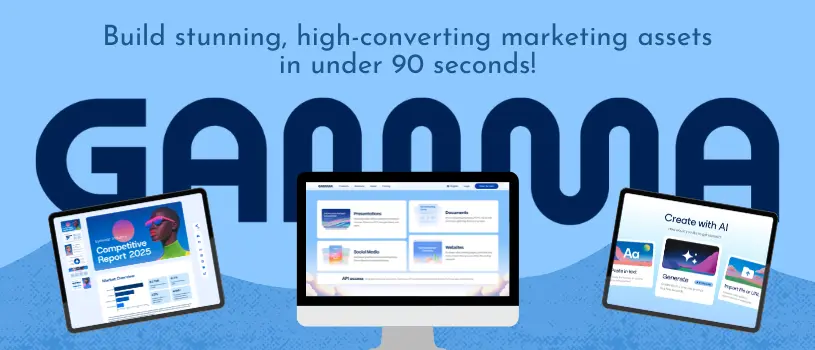
Ready to scale your local agency without expanding your design team? Try Gamma for Free to build stunning, high-converting client pitches and interactive lead-gen assets in under 90 seconds.