Client work moves fast, and the deck often gets built at midnight before a big meeting. If you’ve ever stared at a blank slide wondering how to make your ideas look as sharp as your thinking, you know the struggle!
Consultants and freelancers are ditching hours of manual formatting and using AI design tools to turn rough notes into polished client presentations in minutes, not days.

Clients judge your expertise partly on how your work looks before they ever hear you speak. A messy slide deck can undercut months of smart strategy work.
The good news? No design skills are required anymore to produce something that looks like it came from an in-house creative team.
Key Takeaways
- Client presentations built with AI tools can look polished without any design training.
- A repeatable workflow and branded system save consultants hours on every project.
- Choosing the right sharing format and tool plan matters as much as the content itself.
Why Client Presentation Quality Matters Before the First Meeting
The look of your presentation, proposal, or pitch often shapes a client’s first opinion of your work, sometimes before you say a single word. Business professionals working with tools like PowerPoint, Google Slides, or Canva know that formatting eats time that should go toward strategy and client thinking instead.
Visual Credibility Signals Delivery Readiness
Clients read visual polish as a sign of competence. A cluttered slide with mismatched fonts suggests rushed thinking, even if the ideas inside are strong.
A clean, well-organized deck tells the client you respect their time and take the engagement seriously. This matters most in the first few slides, where trust gets built or lost fast.
The Hidden Cost of Formatting and Fragmented Tools
Many consultants bounce between a writing tool, a design tool, and a slide tool just to finish one proposal. Each switch adds friction and steals time from billable work.
Hours spent aligning text boxes or resizing images rarely show up on an invoice. That time comes straight out of your margin.
Where Traditional Slides Create Avoidable Friction
Classic slide software forces you to think in individual slides instead of a full story. This makes it easy to lose the thread of your argument while fighting with layout tools.
Common friction points include:
- Copy-pasting content between formats and losing formatting
- Manually resizing charts and images on every slide
- Rebuilding the same slide structure for every new client
- Struggling to keep font and color consistency across a deck
The No-Design Agency Workflow From Brief to Client-Ready Asset
Building a client-ready pitch deck or sales deck does not need to start with a blank slide. An AI presentation tool can take your raw discovery notes, call transcripts, and existing copywriting and turn them into a structured draft with smart layouts, charts, and space for case studies.
Start With Discovery Notes, Transcripts, and Existing Copy
The best starting point is whatever you already have. Discovery call notes, client emails, past proposals, and even messy bullet lists all work as raw material.
Feed that content into an AI tool instead of starting from a blank page. This preserves the client’s actual words and priorities, which keeps the final presentation grounded in their real needs.
Build the Narrative Before Generating the Design
Structure comes before styling. Decide on the story arc first: the problem, your approach, the proof, and the ask.
A clear narrative outline prevents the common trap of a pretty deck with a confusing message. Once the story flows logically, the visual layer can reinforce it.
Use Smart Layouts to Make Complex Ideas Easier to Scan
Dense paragraphs lose readers fast, especially in a client meeting where attention spans are short. Smart layouts break information into digestible chunks: comparison tables, timelines, or side-by-side visuals.
Charts work better than long text blocks when showing data trends or before-and-after results. Case studies land harder when paired with a simple visual instead of a wall of text.
Review AI Output for Accuracy, Relevance, and Voice
AI-generated drafts save time, but they still need a human check. Read every slide for factual accuracy, especially numbers, client names, and dates.
Adjust language so it sounds like you, not a generic template. A quick pass for tone and relevance turns a good draft into something that feels custom-built for that specific client.
High-Value Client Assets Consultants Can Produce Faster
Consultants juggle more than slide decks. Proposals, pitch decks, sales decks, video sales letters, and even standalone websites all fall under the same time-pressured production cycle.
Each one benefits from a faster, more structured build process.
Tailored Proposals That Clarify Scope and Next Steps
A strong proposal spells out scope, timeline, and pricing without ambiguity. Clients want to see exactly what they are buying and when they will get it.
Reusing a proposal structure while customizing the specifics for each client cuts drafting time significantly. This keeps the focus on the client’s actual problem.
Pitch Decks for Strategy, Investment, and Partnership Conversations
Pitch decks carry more weight than most other client assets because they often open or close a deal. Startup founders raising a funding round and consultants pitching a new engagement both need the same thing: a clear story backed by credible numbers.
A tight pitch deck usually runs ten to fifteen slides and answers the who, what, why, and how quickly.
Sales Decks and Video Sales Letters for Revenue Teams
Sales teams need decks that move fast in live conversations and video sales letters that work without a presenter in the room. Both formats depend on clear visuals and a simple story arc that a viewer can follow without extra explanation.
Marketers and sales teams benefit from having reusable sections they can swap in and out depending on the buyer’s industry or pain point.
Project Updates, Workshops, and Executive Readouts
Not every asset is external. Educators running workshops and consultants delivering executive readouts both need materials that communicate progress clearly to a room full of stakeholders.
These internal-facing assets often get rebuilt every week or month, so a fast, repeatable process matters just as much here as it does for client-facing work.
Standalone Websites for Proposals and Idea Validation
Some ideas deserve more than a slide deck. Startup founders and consultants alike are turning presentations into standalone websites to validate an idea or give a proposal a more interactive feel.
A simple website can act as a living proposal that a client revisits after the meeting ends, unlike a static file that gets buried in an inbox.
Creating a Repeatable Branded Presentation System
A one-off great deck is nice, but a repeatable branded system is what actually scales a consulting or freelance practice. Setting up reusable themes, brand colors, and logo standards once means every future presentation and website starts from a consistent, professional foundation.
Set Reusable Themes, Brand Colors, and Logo Standards
Build a theme once with your brand colors, fonts, and logo placement locked in. This removes the need to make design decisions every single time you start a new project.
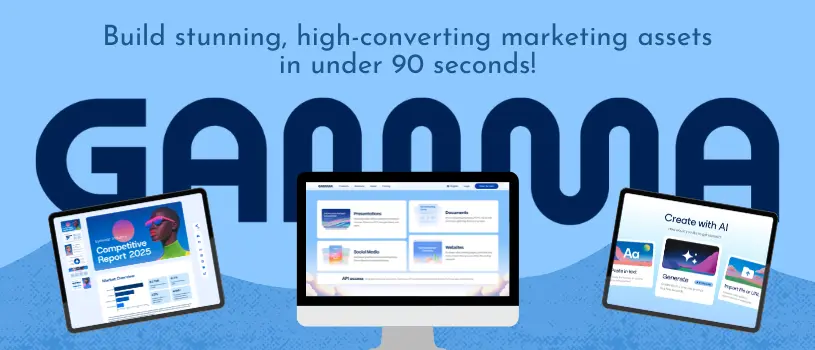
Tools like Gamma and Gamma Pro let consultants and freelancers save these settings and apply them automatically to new presentations and websites. That consistency builds recognition across every client touchpoint.
Create Modular Content Blocks for Common Engagements
Most consulting engagements follow similar patterns: discovery, findings, recommendations, and next steps. Building modular blocks for these recurring sections means you are rearranging pieces instead of starting fresh each time.
This approach also makes it easier to train a junior team member or subcontractor to build decks that match your standard.
Personalize the Story Without Rebuilding Every Deck
Reusable structure does not mean generic content. Swap in the client’s name, industry details, and specific data points while keeping the underlying framework intact.
This balance of speed and personalization is often what separates a template that feels lazy from a client asset that feels custom-made.
Use Collaboration and Live Links to Keep Materials Current
Client feedback rarely arrives all at once. Live, collaborative links let you update a presentation or website in real time instead of emailing new file versions back and forth.
This also solves the version control problem that plagues traditional slide and document workflows, where three people end up editing three different copies of the same file.
Sharing, Exporting, and Measuring Client Engagement
The way you deliver a presentation shapes how a client experiences it. Choosing between a PDF, a PowerPoint export, or a live browser-based link depends on the client’s habits, the complexity of the content, and whether you need to track engagement after the meeting ends.
When to Share a Live Web Experience Instead of a Static File
A live web link works best when the content includes embedded videos, interactive charts, or material that might get updated after the initial send. It also lets you control access and see when a client actually opens the material.
Static files are simpler and more familiar for clients who prefer to download and forward things through email.
Choosing Between PDF, PowerPoint, and Browser-Based Delivery
Each format has a place depending on the situation.
- PDF: Best for formal, unchanging documents like signed proposals or final reports
- PowerPoint: Useful when a client’s team needs to edit or present the file themselves
- Browser-based link: Ideal for interactive content, real-time updates, and tracking engagement
Embed Supporting Evidence and Multimedia Without Overloading the Story
Charts, case studies, and short videos add credibility, but too many at once bury the main message. Pick two or three strong pieces of evidence rather than including everything you have ever produced.
A single well-placed case study often does more convincing than five scattered data points.
Use Engagement Signals to Improve Follow-Up Conversations
Tracking whether a client opened a proposal, and which sections they spent the most time on, gives you a real edge in the follow-up call. If they lingered on the pricing page, that tells you exactly where to focus the next conversation.
This kind of signal is impossible to get from a PDF sitting in someone’s downloads folder.
Choosing the Right Tool and Plan for Your Practice
Picking the right AI presentation tool comes down to how often you build client-facing work and how much control you need over design details. Consultants and freelancers weighing Gamma pricing, AI credits, and Gamma Pro against options like PowerPoint, Canva, Tome, and Beautiful.ai should think about speed, brand consistency, and how each tool handles no design skills on the user’s end.
When Gamma Fits a Fast, Client-Facing Workflow
Gamma tends to work best for consultants who need to move from a rough idea to a polished, client-ready presentation or website in a single sitting. Prompt-based generation and smart layouts remove most of the manual formatting work that eats into billable hours.
You can explore Gamma’s AI-powered tools built specifically for consultants and freelancers to see how the workflow fits your own practice before committing to a plan.
How Gamma Compares With PowerPoint, Canva, Tome, and Beautiful.ai
PowerPoint offers deep manual control but demands more time and design skill. Canva leans toward social and marketing graphics rather than long-form client decks.
Tome and Beautiful.ai share some AI-generation features with Gamma, but reviewers often note Gamma’s strength in producing multiple formats, decks, documents, and websites, from a single source of content.
Understanding Gamma Pricing, AI Credits, and Gamma Pro
Gamma’s free tier includes a set number of AI credits, enough for several decks before you need to upgrade. Paid plans like Gamma Pro add features such as PowerPoint export and higher credit limits for consultants producing client materials regularly.
Consultants who bill multiple client projects a month typically find the paid tier pays for itself quickly in time saved.
When to Use Specialist Design Support Instead
AI tools handle most standard client decks well. But sometimes, you need a dedicated designer.
Think about highly custom brand campaigns or complex data visualizations. If a client has super strict brand guidelines, hands-on design expertise might be the way to go.
Bringing in extra support at the right time keeps your projects looking sharp and your reputation shining.